When your RV furnace won’t turn on, won’t light, or blows cold air, the right fix depends on which furnace you have. Nearly every forced-air RV furnace is either a Suburban® or a Dometic®, and older Atwood® furnaces are part of the Dometic family. The two brands differ in how they signal a problem, where the power switch sits, how you reach the unit, and which replacement parts fit. This guide walks through troubleshooting and repair for both.
Which RV Furnace Brand Do You Have?
Every RV furnace has a data plate listing its manufacturer, model number, serial number, and BTU rating. You’ll usually find it on the furnace itself, behind the cover panel inside your RV. Your owner’s manual should list your furnace, too. For more on what the data plate tells you, see our guide to how an RV furnace works, or read up on the major RV heating system brands.
Once you find the model number, here’s how to read it:
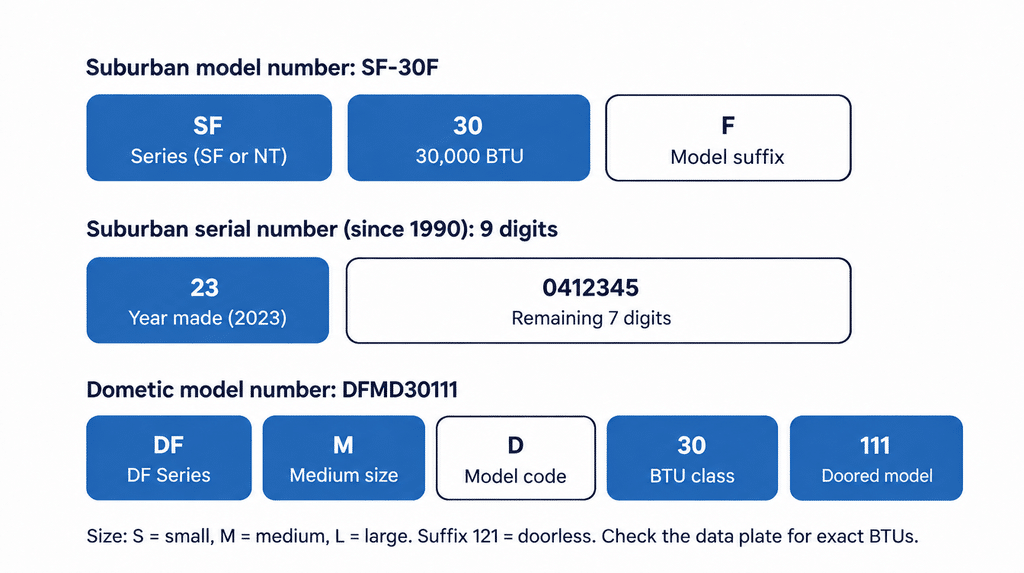
Suburban: Model numbers like SF-30F, SF-35FQ, or NT-30SP start with the series (SF or NT), followed by the BTU rating in thousands. An SF-30, for example, is a 30,000-BTU furnace. Serial numbers since 1990 are nine digits long. The first two digits are the year the furnace was made, and the next two are the week. Replacement parts often fit by serial range, so compare the year first: a serial starting with 98 (1998) is older than one starting with 01 (2001), even though it’s a higher number.
Dometic: Model numbers start with DF, followed by a letter for the furnace size (S for small, M for medium, L for large) and a number for its BTU class. A DFMD30111, for example, is a medium furnace in the 30,000-BTU class. The number is a class, not an exact rating, so check the data plate for your furnace’s actual output. A model ending in 111 is built for an exterior access door, which is sold separately, while one ending in 121 is doorless. Newer Dometic Essential furnaces add an H after the size letters, as in DFMDH30111.
Atwood: Older furnaces sold under the Atwood name, including the Hydro Flame line, are part of the Dometic family but use four-digit model numbers, such as the 7900, 8500, or 8900 series.
Where Can I Find Suburban or Dometic Furnace Manuals?
Start with the model number on your furnace’s data plate. Dometic® posts the owner’s and installation manuals for its furnaces on its website and now supports former Atwood® models as well. Suburban® manuals are published by Airxcel, Suburban®’s parent company. Your RV’s owner documents may also include a copy. Each manual includes troubleshooting guidance specific to your model.
Suburban RV Furnace Troubleshooting and Repair
Suburban®’s current SF and NT series furnaces are available in ducted and direct-discharge (non-ducted) versions. If you’re considering a new unit rather than a repair, see our guide to RV furnace replacement.
How a Suburban Furnace Tells You Something Is Wrong
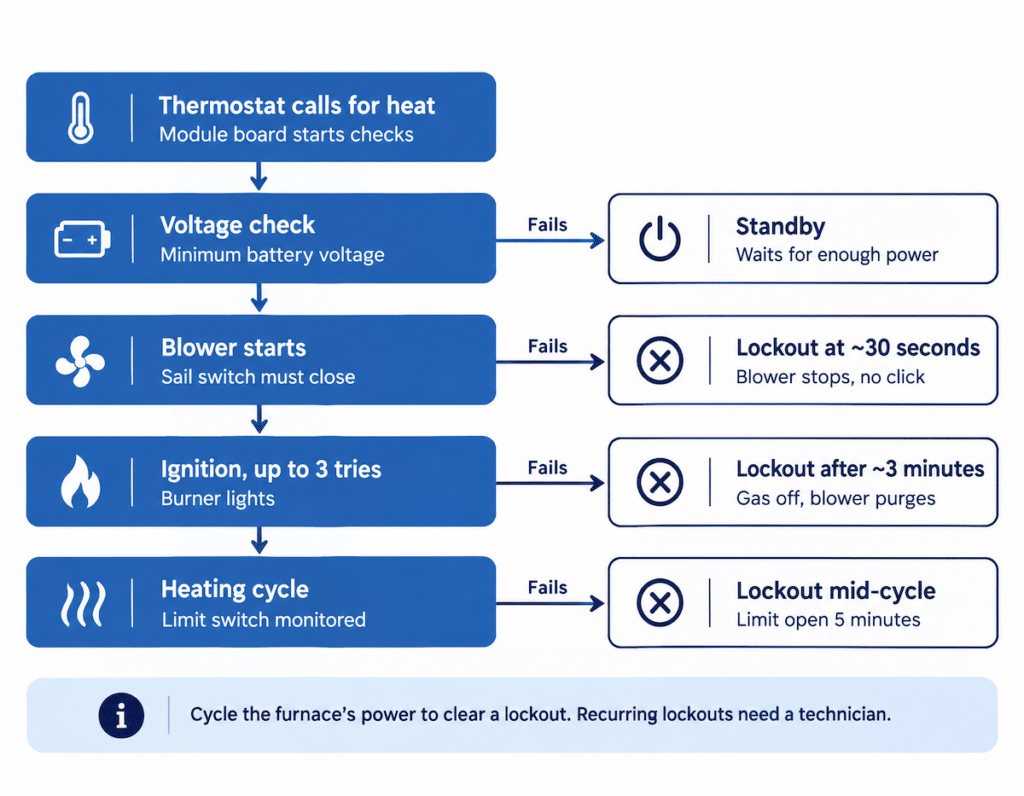
A Suburban® furnace’s control board, which Suburban® calls the module board, runs a series of checks every time your thermostat calls for heat. Knowing that sequence helps you read what the furnace is doing:
- Low voltage puts it on standby. The module board checks for a minimum voltage before it starts. If your battery is too low, the furnace remains in standby mode until sufficient power is available.
Technician Tip: A sail switch stuck in the closed position can also prevent the blower from starting. This is true on Suburban® and Dometic® furnaces.
- The blower runs, then stops without a click. After the blower starts, the board waits for the sail switch to confirm that the blower is moving enough air. If that doesn’t happen within 30 seconds, the board locks out and shuts down the blower. A blower that runs briefly and stops without ever clicking points toward the sail switch or an airflow problem.
- The blower runs for about three minutes after failed ignition. A Suburban® furnace makes three tries to light. If none succeed, the board closes the gas valve, runs the blower for about three minutes to clear the combustion chamber, and then shuts down in lockout. If your furnace blows unheated air for a few minutes and then stops, that’s likely what you’re seeing.
- It shuts down during a heating cycle. If the furnace’s limit switch opens and stays open for five minutes while heating, the board locks out. That usually indicates overheating due to restricted airflow.
A lockout clears when you cycle the furnace’s power, essentially resetting it. What’s specific to a Suburban® is which lockout you’re seeing: the blower stopping at about 30 seconds, after about three minutes, or partway through a heating cycle. Each one points a certified RV technician toward a different part of the system. If the same lockout keeps recurring, it’s time to call a technician.
Suburban Repair Notes
Electrode replacement on SF models is more involved. Suburban®’s labor schedule allows more time to replace the electrode on SF models than on its other furnaces, so expect this SF-series repair to take longer.
Control board compatibility. Suburban®’s 521099 module board is designed to fit Suburban®’s furnaces as a replacement board. Some older Suburban® furnaces need a wiring kit to convert to the current three-try ignition board, so share your model and serial number when ordering parts or scheduling service.
Dometic RV Furnace Repair and Troubleshooting
Dometic®’s furnace line traces back to Hydro Flame™, which Atwood® acquired in 1993. Today’s furnaces are mostly part of the DF Series, including the DF Essential models. If you have an older RV, your furnace may still bear the Atwood® or Hydro Flame™ name, but these tips still apply.
How a Dometic Furnace Tells You Something Is Wrong
A Dometic® furnace indicates problems through a status LED on the electronic control board (usually a red light in the center of the board). Some newer systems may also display codes on compatible digital thermostats such as the Comfort Control Center 2.
Tech Tip: On models with exterior access, open the door to view the control board and LED. On doorless units, remove the return-air grille and use a mirror and flashlight to locate the red diagnostic LED on the board.
Ignition Control Diagnostic Codes
The following charts give the diagnostic codes given by the ignition control when faults are present. The standard is three tries for ignition controls.
- A soft lockout is a timed condition that allows additional attempts to correct the problem. A hard lockout requires resetting the thermostat or turning the power switch off, then back on.
Dometic Diagnostic Chart
| FAULT | LED INDICATION | LOCKOUT |
|---|---|---|
| Internal Circuit Board Failure | Steady On, No Flashing | Hard |
| Limit Switch/Airflow Problems | 1-Flash With 3-Second Pause | Soft |
| Flame Sense Fault | 2-Flashes With 3-Second Pause | Hard |
| Ignition Lockout Fault | 3-Flashes With 3-Second Pause | Soft (1hr. retry) |
Note: Some boards also have 4-flash (high-voltage) and 5-flash (low-voltage) codes.
Once you have identified your error code, here are your next steps to come to a resolution:
Internal Circuit Board Failure (Steady On — Hard Lockout)
Cycle power. If the steady light remains on, the control board has failed and needs to be replaced by a certified RV technician.
Limit Switch / Airflow Problems (1 Flash — Soft Lockout)
Check that all vents and the return air opening are open and clear. Look for blocked or crushed ducts. If airflow looks normal, have a technician inspect the sail switch and limit switch.
Flame Sense Fault (2 Flashes — Hard Lockout)
Have a technician inspect and clean or replace the igniter/flame sensor electrode and verify the burner is lighting properly.
Ignition Lockout Fault (3 Flashes — Soft Lockout)
Confirm propane is on and other appliances work. If the furnace still won’t light after a reset, have a technician check gas pressure, the burner, electrode, and gas valve.
Soft lockouts can often be cleared by correcting the issue and cycling the thermostat or power switch. Hard lockouts require a manual reset. Recurring codes or any work involving the gas system should be handled by a certified RV technician.
Dometic Furnace Power Switch and Breaker
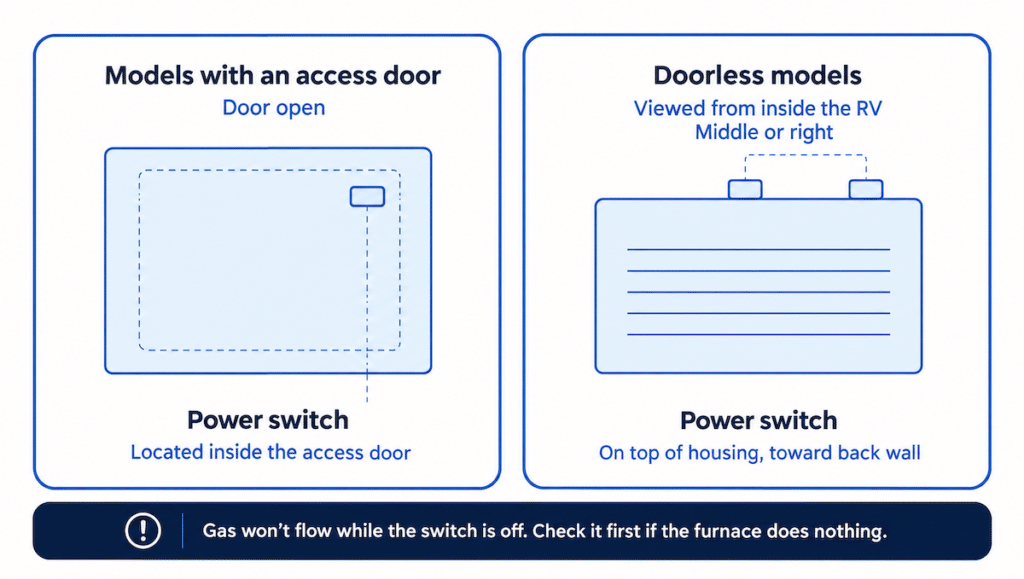
On Dometic® DF Series furnaces with an access door, the power switch is located inside the door. On doorless models, the power switch is usually on top of the furnace housing up against the wall in the middle or on the right-hand side as viewed from the inside (also back against the wall). Gas won’t flow to the burner while the switch is off, so check it first if your furnace does nothing.
Some Dometic® furnaces (including the DFMD35, DFLD35, and DFLD40) come with a 15-amp circuit breaker that installs in the RV’s main panel. These units can draw high surge current at blower startup and igniter engagement, which may cause nuisance tripping of auto-reset breakers. If this happens repeatedly, replace the auto-reset breaker with a standard 15-amp ATC fuse.
Learn more about the RV furnace ignition sequence and how many tries the board makes.
Dometic Furnace Sail Switch
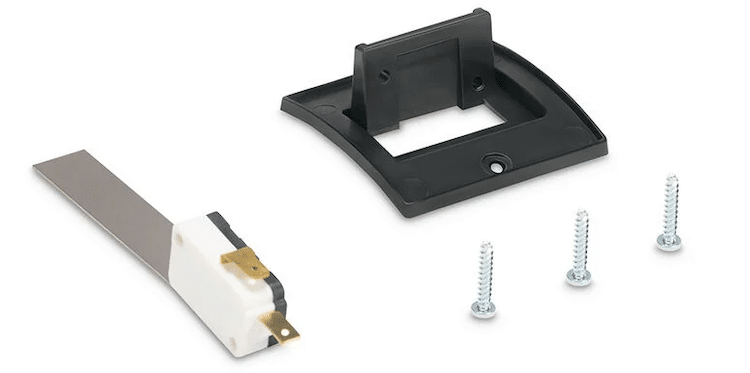
If you’re looking for a Dometic® furnace sail switch, here’s what’s specific to Dometic® and Atwood® furnaces.
Atwood® parts are Dometic® parts. Sail switches, igniter electrodes, and other parts for Atwood® Hydro Flame™ furnaces are now sold under the Dometic® name, including the 31377 low-airflow sail switch. They also offer an airflow sail switch upgrade kit with a mounting bracket (part 36165).
Reaching it depends on your furnace. 79- and 80-series furnaces must be removed from the RV to access the sail switch, as well as the blower motor and blower wheels. Mid-size and large furnaces installed with an outer door can be serviced in place. Doorless installations generally take longer to service as well.
Match the part to your model number. Sail switches aren’t one-size-fits-all, even within this brand family. Check your data plate before ordering. Because the sail switch is one of your furnace’s safety controls, trust its installation to a trained RV technician.
Dometic Repair Notes
- There’s no pilot to light. DF Series furnaces use an ignition device that automatically lights the burner. Don’t try to light it by hand.
- Don’t power the furnace with a battery charger. Dometic®’s manual warns against using a battery charger to power DC furnaces, even during testing.
- Use approved parts. Dometic®’s operating instructions specify the use of only Dometic® replacement parts and components approved for your furnace. Keep that in mind when comparing OEM parts against universal or aftermarket options.
Replacement Parts for Suburban and Dometic Furnaces
When shopping for a replacement part for a Suburban® or Dometic® furnace, you’ll typically see OEM parts, made or approved by your furnace’s manufacturer, and universal or aftermarket parts, designed to fit multiple models. Fit is model-specific, so match your furnace’s model number (and for Suburban®, its serial number) before you order.
Camping World’s certified technicians repair Suburban® and Dometic® RV furnaces, including older Atwood® models, and mobile service is available at select locations.
For typical repair costs, see our RV furnace repair cost guide.
Suburban and Dometic Furnace Warranties
Before you pay for a furnace repair on a newer RV, check if it’s still under warranty:
Most Suburban® furnaces carry a two-year limited warranty on parts and labor for the original owner. Heat exchangers have continued coverage in years three through five, without a labor allowance.
Common Dometic® DF Series furnaces carry a two-year warranty covering labor, specified parts, and freight.
Routine maintenance isn’t covered under either manufacturer’s warranty. Furnaces sold under the Atwood® name were built before Dometic®’s rebrand, so they’re past the two-year coverage period.
Our RV warranty guide explains more about how appliance warranties work.
Still troubleshooting? Our RV furnace troubleshooting guide walks through the most common problems across brands, from a furnace that won’t turn on to one that blows cold air.
Have questions? Good Sam Elite members can call the Technical Support hotline at 844-649-4700 for troubleshooting and maintenance tips.
Is your RV’s furnace a Suburban® or a Dometic®, and what issues have you run into? Share your experience in the comments below.